Asset Health at a Glance: How Teqtivity Helps You Spot Issues Early
Managing a growing fleet of devices can be challenging, especially when small issues go unnoticed and eventually lead to bigger problems. Teqtivity’s Asset Health feature helps prevent this by giving you a clear view of how your assets are performing, so you can address concerns before they affect daily work.
The feature brings together real-time status checks, detailed reports, and historical insights to help IT teams stay ahead of potential issues.
A Quick Snapshot of Asset Health
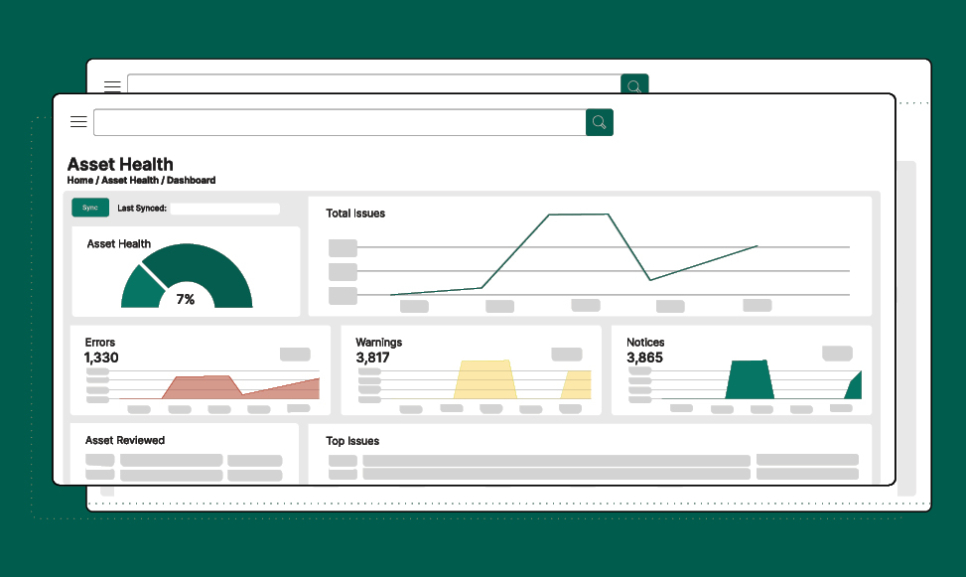
When you open the Asset Health tab in Teqtivity, you’ll see a simple health percentage that reflects the current condition of your devices. This number is updated automatically based on the tests you have enabled. A higher percentage indicates healthy assets, while a lower one signals that some devices may need attention.
You’ll also see a line graph that shows trends over time, including counts of issues, errors, warnings, and notices. These categories give helpful context. Errors may need immediate review, warnings may point to developing concerns, and notices highlight general information. This overview helps you quickly see where to focus and how issue levels are changing.
Detailed Health Reports You Can Control
For a deeper look, the Health Reports page breaks down specific issues into clear categories. Each item shows how many devices are affected. Examples may include missing MDM enrollment, inactive users still assigned equipment, or devices marked lost but still checking in.
What makes this page helpful is its flexibility. You can enable or disable tests based on what matters to your organization. This keeps the reports relevant as your environment or policies change, and prevents unnecessary clutter.
Understanding Trends with Health History
Spotting patterns is just as important as identifying current issues. Teqtivity’s Health History page lets you review data across weeks, months, or years. The tool displays how many issues occurred during each period, helping you answer questions such as:
- Are certain problems repeating?
- Did policy or software updates affect asset health?
- Are things improving or declining over time?
- Should you plan for upcoming replacements or maintenance?
This history gives you context for planning and helps you make long-term decisions with confidence.
Easy Report Exporting and Sharing
The Export page makes it simple to share what you find. You can download reports in PDF, CSV, or Excel formats, or email them directly from the platform. This is especially helpful when preparing updates for leadership, audit reviews, or team discussions.
With quick access to clear, organized data, your team can communicate findings easily and take action faster.
Why Monitoring Asset Health Matters
As organizations rely on more devices, staying ahead of issues becomes essential. Something small, like a missed update or a device not checked into MDM, can lead to security risks, slower performance, or preventable downtime.
Teqtivity’s Asset Health feature helps by:
- Showing real-time device conditions
- Allowing you to customize what you monitor
- Helping you track how issues develop over time
- Making reports easy to review and share
- Supporting a proactive, not reactive, approach to IT management
It provides the clarity and control needed to keep your devices dependable and your teams productive.
Teqtivity’s Asset Health feature gives you a complete picture, from quick snapshots to detailed reports and long-term trends, so you can catch issues early and maintain a healthier IT environment.