Getting Started with Teqtivity: Your Guide to Centralized Asset Management
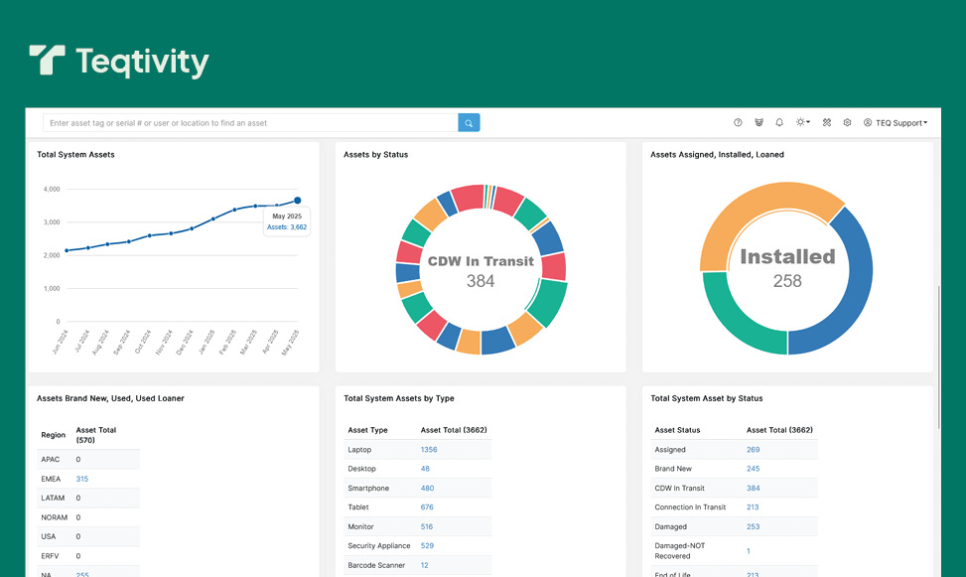
Effective asset management is crucial for any organization, especially when dealing with IT equipment, production tools, and service resources. Yet, many companies still rely on disconnected spreadsheets or outdated systems, leading to inefficiencies, missed maintenance, and unnecessary costs.
Centralized asset management, however, solves these challenges by providing superior organization, visibility, and control. Teqtivity offers a seamless solution that makes it easier to organize, monitor, and improve asset management across the board.
Ready to see how? Let’s explore configuring and leveraging Teqtivity for your centralized asset management needs.
Teqtivity Overview: A Modern Asset Management Solution
Teqtivity is a cloud-based asset management platform designed to help organizations track, organize, and control their assets in real-time. It supports a wide range of industries, including manufacturing, education, healthcare, construction, and more. Here are some features that make it stand out:
Real-Time Asset Tracking
Teqtivity’s centralized tracking system records all assets in one location, giving you a complete overview of your entire inventory. This streamlines organization and monitors assets effectively, minimizing the risk of loss or theft. This is particularly beneficial for industries where equipment uptime is critical and any downtime can lead to financial loss.
Customizable Dashboards And Reporting Tools
Teqtivity offers customizable dashboards and reporting tools. These features provide business managers, IT managers, and IT teams in general with insights into asset utilization, depreciation, and compliance. The tool generates customized reports that help in strategic decision-making and ensure regulatory adherence.
Integration Capabilities
Teqtivity’s integration capabilities further enhance its utility. It seamlessly connects with Mobile Device Management (MDM) solutions like Google MDM, Jamf, and Kandji, allowing for centralized control over diverse IT environments. This integration ensures that all devices, whether in the office or remote, are accounted for and managed efficiently.
Managing Your Assets with Teqtivity: A Feature Guide
Centralized asset management is essential for any modern organization that manages diverse resources, including IT and mobile devices, as well as other assets and tools used in the production and delivery of services. Teqtivity makes this process simple, efficient, and trackable. Here’s how you can manage your assets using Teqtivity’s key features:
Initial Setup and Asset Type Configuration
You need to set up your asset types within Teqtivity for centralized asset management. This includes defining categories and subcategories for your assets, as well as attributes that are relevant to each type. This will allow you to easily organize and manage your assets based on their specific characteristics.
As shown below, Teqtivity’s “Asset Filter Panel” provides a clean and flexible interface where you can input details like asset type, status, manufacturer, location, lease dates, and user assignment. This foundational setup ensures that all assets are organized according to your internal workflows.
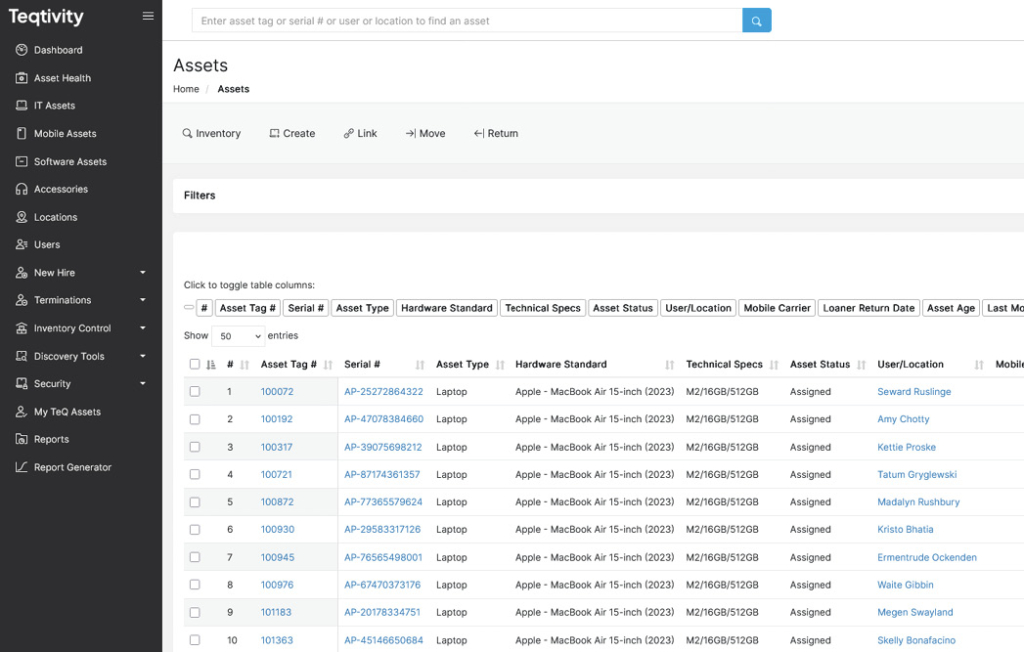
This interface supports scalability. So, no matter if you’re managing hundreds or thousands of assets across different departments, Teqtivity allows for consistent categorization, and enables a smooth asset onboarding process from day one.
Assigning Assets Using “In Stock Computers”
Once your asset categories are set, go to Inventory Control > In Stock Computers, as you can see in the image below. Here, you’ll see a searchable list of available devices, including details like serial number, specs, and storage location. This is where you assign assets to users, departments, or projects, which is essential for IT teams, facilities managers, or anyone overseeing production and service equipment.
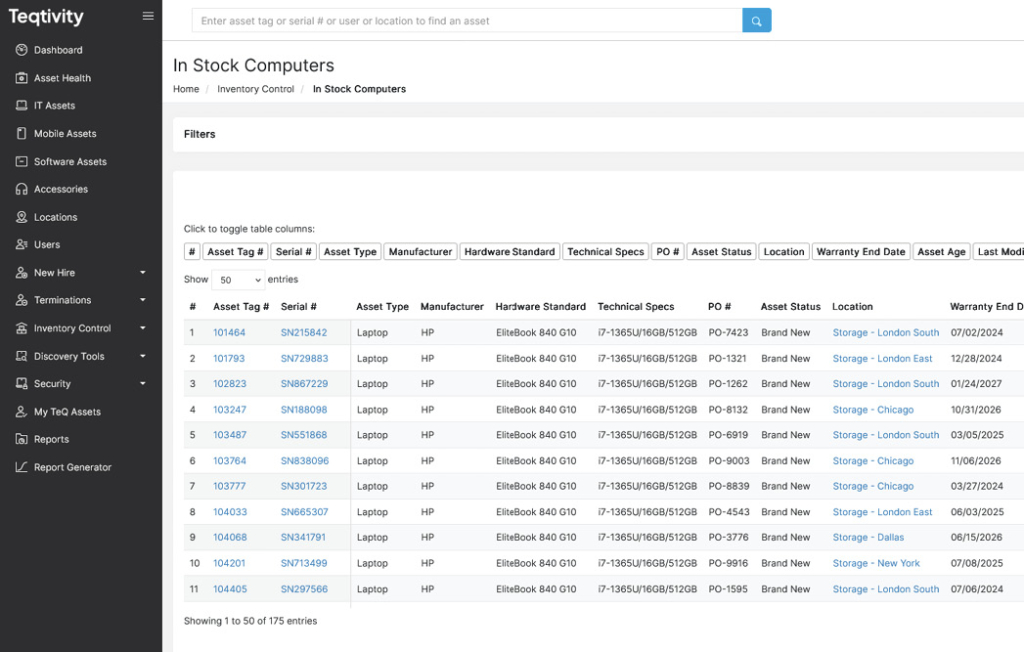
You can track each item’s warranty, location, and asset status to ensure complete visibility of its lifecycle. However, without assignment, assets can easily go unused or untracked, creating both cost and compliance issues in large organizations.
Analyzing Usage with the Consumption Report
Go to Inventory Control > Consumption Report to gain visibility over how assets are being deployed. This tool allows you to filter data by user, department, asset type, and assignment date. Moreover, it is highly valuable for IT administrators and department leads who need to monitor asset allocation over time.
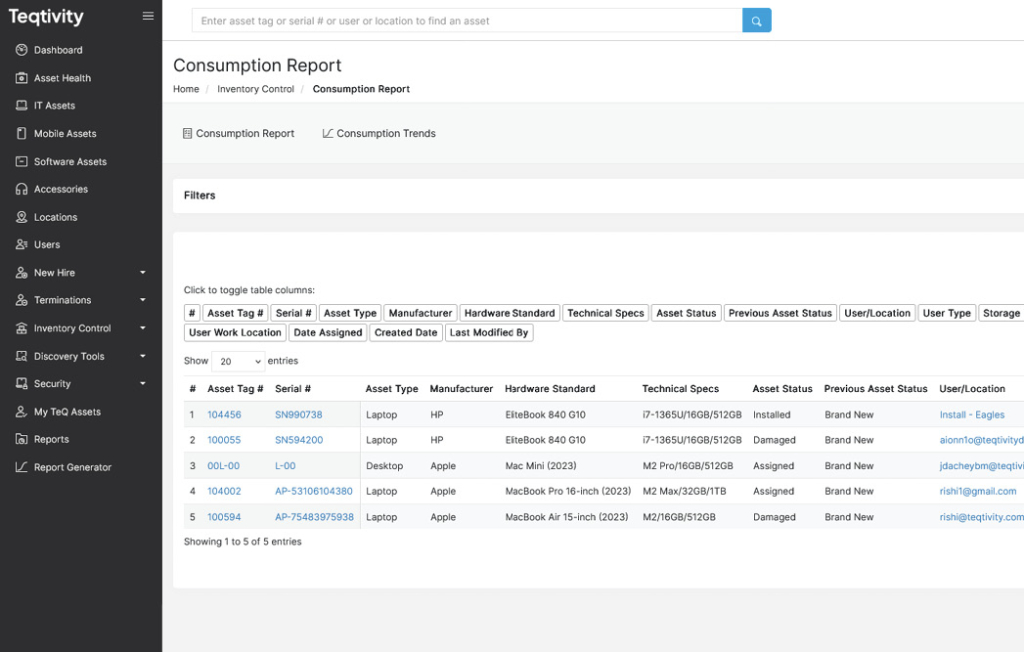
However, without consumption insights, asset management becomes reactive instead of strategic. It leads to waste, inefficiency, or underutilization of valuable resources. But you can identify trends in how laptops, desktops, and other assets are consumed across production and service units.
Optimize Distribution with Users to Asset Ratio
You can benefit from the Users to Asset Ratio to monitor how assets are distributed across departments. This is especially useful for IT, production, and service teams to ensure operational balance and resource fairness. It helps identify underutilized or overburdened users, improving asset management efficiency.
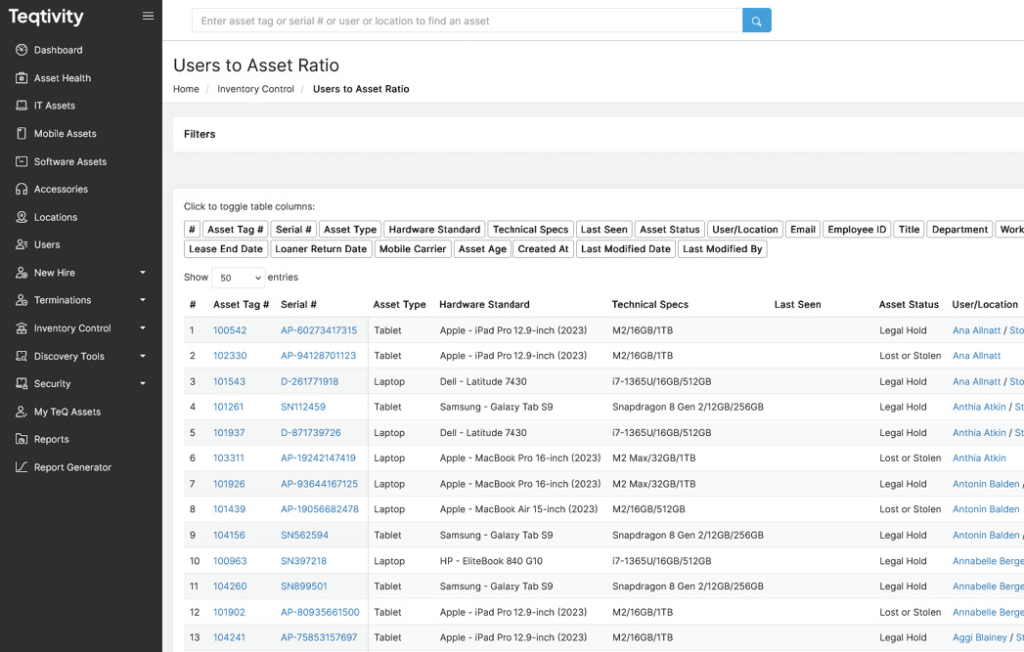
It also helps to discover underutilized or overburdened users, improving your asset management efficiency. Teqtivity’s dashboard allows filtering by asset type, user status, and department. Ignoring this data may lead to unnecessary purchases or compliance gaps, especially when scaling across multiple business units or remote teams.
Strengthen Inventory Accuracy with Cycle Counts
Navigate to the Cycle Count feature to ensure ongoing precision in your asset management system. Teqtivity’s Cycle Count and Consumption Trend features play a crucial role in strengthening inventory management. While Cycle Count ensures that physical stock aligns with system records through regular verification, the Consumption Trend report highlights how frequently assets are used over time.
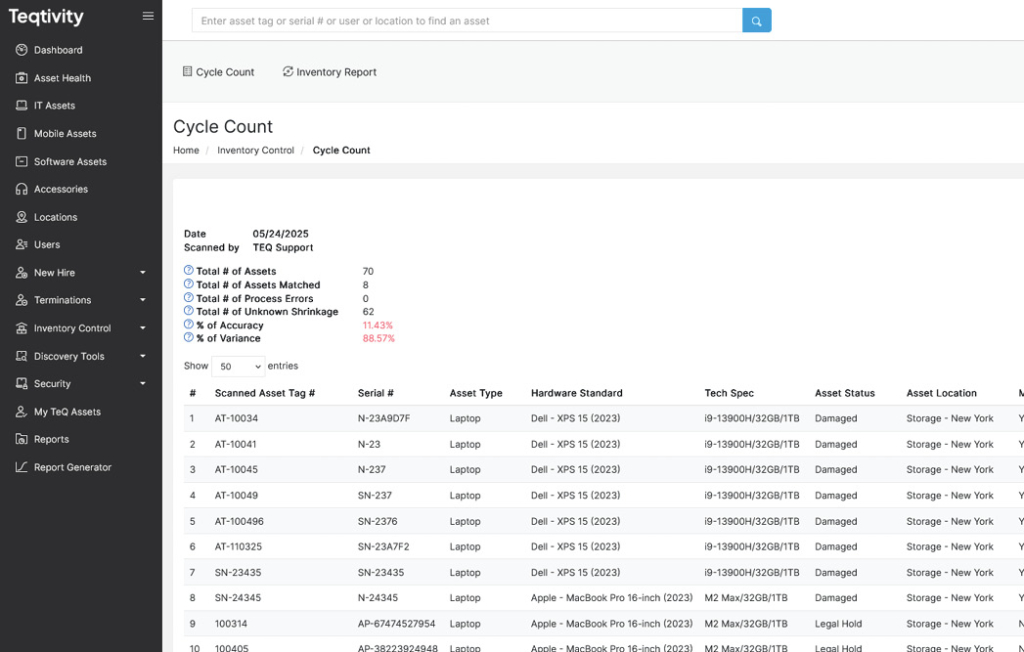
Together, these tools help production and service teams detect underutilized or missing equipment, prevent operational disruptions, and make data-driven purchasing decisions. However, ignoring these insights can lead to inventory inaccuracies, unnecessary spending, and compliance risks. So, organizations can maintain a reliable, efficient, and transparent asset tracking system by integrating both features into their ITAM process.
Boosting Productivity and Compliance Through Teqtivity
Without a structured asset management system, organizations risk inefficiencies, compliance violations, and increased operational costs. However, Teqtivity addresses these challenges by offering a comprehensive solution that not only boosts productivity but also ensures compliance across all levels of asset management.
Teqtivity’s asset management platform is designed to enhance productivity and ensure compliance across various industries. It provides real-time visibility into asset allocation and usage, enabling IT teams, operations managers, and department leads to make informed decisions and optimize resource utilization.
It also offers a centralized asset repository, which consolidates all asset data into a single, accessible platform. This centralization eliminates data silos and streamlines asset tracking and allows organizations to manage IT assets efficiently.
Teqtivity’s integration capabilities with tools like Jira, Okta, and Jamf further facilitate seamless workflows and enhance operational efficiency. Overall, it enables organizations to gain complete visibility and control over their assets, which leads to increased productivity and cost savings.
Key Takeaways
So, if you’re looking to optimize your asset management processes, Teqtivity is the solution for you. Contact Teqtivity and request a free demo!
Key Takeaways
Before you leave, here are the key takeaways from the article:
- Teqtivity enables centralized asset management by consolidating digital and physical IT assets across departments and user roles.
- It provides IT teams and operations managers with real-time visibility, robust reporting, and compliance-ready data.
- The platform enhances organizational production and service operations by reducing asset downtime and optimizing resource allocation.
- With secure integrations and customizable dashboards, Teqtivity helps organizations maintain control, boost productivity, and ensure compliance across their IT environment.