10 IT Asset Management Best Practices for Schools

We all know that managing IT resources in a school is a complex task that demands precision and adaptability. With tight budgets, stringent compliance requirements, and growing security concerns, schools often struggle to keep their technology infrastructure running smoothly.
However, IT Asset Management (ITAM) offers a structured approach to tracking and optimizing these resources. It ensures that schools can maintain compliance, reduce costs, boost efficiency, and make smarter use of their IT investments.
Therefore, in this guide, we’ll explore 8 IT asset management best practices for school administrators that can help you effectively manage your school’s technology resources.
So, let’s get started!
1. Establish a Comprehensive ITAM Policy
The foundation of any successful IT asset management system is a clear and actionable policy. To start, schools should clearly define roles, responsibilities, and procedures for every stage of an asset’s life cycle. This includes acquisition, deployment, maintenance, and disposal.
Additionally, having a strong ITAM policy is important for several reasons. It helps schools comply with software licensing agreements and ensures they meet regulatory compliance standards for data protection and e-waste management. For instance, school districts need to track who is responsible for specific assets. They must also ensure that hardware is disposed of in an eco-friendly manner.
By having a structured policy in place, schools can properly manage their assets and avoid costly mistakes.
2. Create a Centralized Asset Inventory
Without a centralized inventory, schools can lose track of their assets. This can lead to misplaced equipment, security risks, and over-purchasing. To avoid this, schools should establish a centralized asset inventory. This involves documenting the type, user, location, purchase date, and current lifecycle stage of each asset in detail.
Moreover, it is projected that 90% of educational institutions globally will rely on digital asset management platforms. These platforms help maintain accuracy and reduce operational inefficiencies.
Modern asset-tracking tools make this process easier. They automate asset discovery and updates, saving time and effort. By creating a centralized system, school officials can identify underutilized resources, track ownership of assets, and quickly conduct audits when needed.
3. Implement Automation Tools
Tracking assets manually is often inaccurate and takes a lot of time. By using automation tools like Teqtivity’s tracking solution, school districts can completely change how they manage their inventory. These tools provide real-time monitoring of assets, giving updates on their location, usage, and performance at any time.
Moreover, automation makes important tasks easier. It helps with tagging new devices, creating performance reports, and fixing issues before they become bigger problems. With the efficiency that comes from improved asset tracking, schools can reduce administrative work and focus more on improving the student experience.
4. Optimize Asset Utilization
Underutilized IT assets can waste a lot of money for schools. Regular reviews help administrators find equipment that is unused or no longer needed.
To make the most of these resources, schools can move the equipment to departments or classrooms that need it the most. With a robust asset management solution, schools can easily access usage data. This data helps make better decisions about where to use IT infrastructure effectively.
5. Enhance Security Measures
IT security is a major concern for schools because they store sensitive information like student data, grades, and staff credentials. Poor asset management can create security gaps, making schools vulnerable to cyberattacks and data breaches.
To address this, schools can integrate ITAM tools with their existing security protocols. This helps protect both physical devices and digital information. For example, regularly updating firmware, using encryption strategies, and maintaining audit trails with asset management software can strengthen security systems. Additionally, conducting frequent vulnerability assessments can further reduce risks and improve overall protection.
6. Lifecycle Management
Every IT asset, from laptops to servers, has a finite lifecycle. Managing this lifecycle properly helps schools get the best return on their investment. It also reduces costs caused by downtime or outdated systems.
Lifecycle tracking helps schools decide when upgrades are needed. It also ensures that resources are disposed of in a responsible way. For example, lifecycle data can alert schools when an asset is approaching the end of its warranty. This allows them to plan and budget for replacements instead of dealing with sudden expenses.
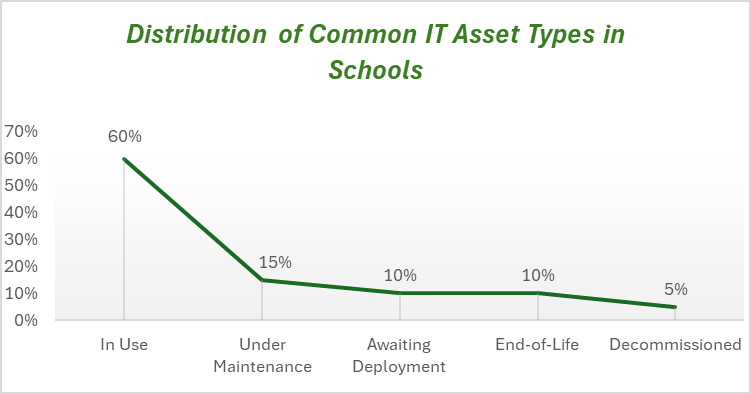
The above-mentioned chart helps school administrators quickly understand where most of their technology resources stand in their lifecycle, supporting data-driven planning for upgrades and replacements.
To achieve this, schools can use tools like Teqtivity. These tools allow schools to create a consistent lifecycle management process. This process includes standardized steps for acquisition, deployment, routine maintenance, and decommissioning.
7. Vendor Management
Effective vendor management helps schools get the best deals for their IT needs. It also simplifies compliance with licensing and contractual agreements. By keeping track of contracts, product warranties, and license expiration dates, schools can avoid fines and downtime.
A well-organized asset management system makes this process easier. It can help schools streamline supplier relationships by centralizing vendor details, contracts, and compliance documents in one system. These tools automate approvals, track suppliers, and keep payments running smoothly, which helps in reducing manual errors and administrative work. With this visibility and automation, schools can focus more on building strong vendor partnerships and making informed, cost-effective decisions.
8. Customizable Reporting
Customized reporting helps school administrators gain clear insights into their asset inventory and usage trends. With ITAM tools like Teqtivity’s management solutions, schools can easily create customized reports for audits, forecasting, and compliance checks.
For example, administrators can see which departments are using specific resources, track when maintenance is due, and identify assets that need replacement soon. By having access to these detailed insights, school administration can make smarter, data-driven decisions. This not only boosts operational efficiency but also enhances the overall learning experience.
9. Train Staff Members on ITAM Practices
To build a sustainable ITAM program, schools need to ensure that every staff member involved in the asset lifecycle knows their role and responsibilities. By conducting training sessions, schools can empower staff to use asset management software effectively. These sessions also help them spot potential issues early and follow best practices for asset procurement and use.
When staff members are properly informed, they play an important role in creating a culture of accountability. This helps prevent the misuse or loss of assets. With a proactive and educated workforce, schools can maintain a secure and efficient IT infrastructure.
10. Monitor Asset Usage for Better Decision-Making
Regularly reviewing asset usage data is important for understanding trends and making smart investment decisions. By tracking how often hardware or software is used, schools can decide if they need to upgrade systems, retire old equipment, or add new resources to meet increasing demands.
To make this process easier, tools like Teqtivity provide clear dashboards and simple analytics. These features help administrators quickly see usage patterns in real time. As a result, schools can reduce waste and make sure their IT systems support their educational goals effectively.
Which is The Best Asset Management Software For School
Teqtivity is the top choice for asset management software. It offers unmatched efficiency and adaptability, which makes it easy to manage school assets. With real-time tracking, administrators always know what is being used and where it is located.
The software comes with customizable features, allowing schools to customize it to their exact needs. It also integrates seamlessly with learning management systems, ensuring smooth operations. In addition, Teqtivity is cost-efficient, helping schools save both time and money by streamlining processes and reducing operational costs.
Teqtivity also focuses on customer support. Through agile development, it ensures a smooth user experience and provides quick solutions to feature requests.Therefore, for schools aiming to optimize IT resources, reduce downtime, and easily adapt to changing needs, Teqtivity is the ideal solution.
Overall, proper asset management is key for schools to run efficiently and effectively. By using the Teqtivity solution, schools can simplify their asset-tracking processes and stay compliant with regulations. Request a demo today to see how Teqtivity can improve your school’s asset management system!
Key Takeaways
Before leaving, read the key takeaways of the article:
- Establish a clear ITAM policy to manage all assets and stay compliant.
- Create a centralized inventory to easily track assets and eliminate inefficiencies.
- Automate asset tracking to save time and reduce administrative work.
- Optimize asset utilization by moving underused resources to areas where they are needed.
- Strengthen security by using ITAM tools with updated school protocols.
- Use lifecycle management to maximize the value of assets and plan replacements effectively.