How To Use Teqtivity’s Asset Management Reports To Make Smarter Business Decisions
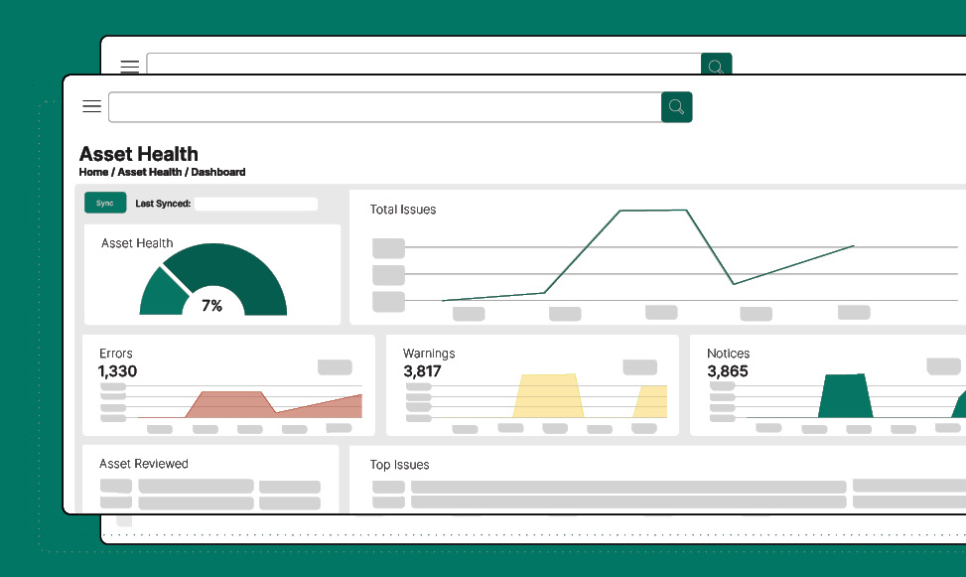
Managing IT assets without structured reporting can lead to inefficiencies, lost equipment, and poor financial planning. According to research, global spending on IT services is expected to reach 5.6 trillion U.S. dollars in late 2025. This highlights the critical need for effective asset tracking, reporting, and financial accountability.
Therefore, an asset management report is no longer just a technical document; it is a strategic tool that connects asset performance with financial services, compliance, and informed decisions.
However, many organizations still rely on outdated spreadsheets or scattered systems. Teqtivity helps solve this challenge by bringing all asset data into one place and turning it into clear, usable reports. The reports help improve return on investment and operational control, and monitor depreciation, manage inventory, and track maintenance history.
Moreover, Teqtivity’s management system supports different types of assets across departments, ensuring complete visibility into assets under management (AUM). So, if you want to learn how to gain better control and visibility over your assets, then read on!
This article will explore how to build and benefit from smart reporting using Teqtivity’s advanced platform.
Why Reporting Is Core to Successful Asset Management
Reporting sits at the heart of any effective asset management system. Without reliable, real-time reports, organizations cannot monitor depreciation, manage inventory, or track asset utilization.
Teqtivity’s platform realizes that and transforms raw data into actionable insights. That enables organizations to make informed decisions across IT operations, financial services, and compliance by consolidating all asset information in one place. Here are the two main benefits of an asset management report:
Benefits of Asset Reports
A well-structured asset management report delivers much more than inventory snapshots. It enhances visibility into assets under management (AUM), provides maintenance history, and supports regulatory compliance.
With Teqtivity, users gain access to dynamic tools like depreciation value reports, asset age trends, and cycle counts, which ensure every asset is accurately tracked and updated.
Moreover, organizations can track the return on investment (ROI) for different types of assets, helping avoid redundancy and improving financial forecasting. These reports are customizable, exportable, and filterable, ensuring that decisions are based on accurate and up-to-date data, which is a cornerstone for any modern asset management software.
From Manual Logs to Real-Time Dashboards
Manual asset tracking through spreadsheets often leads to blind spots, delays, and human errors. However, Teqtivity’s asset management software replaces legacy tools with real-time dashboards that provide unmatched clarity.
By integrating automated features such as user-to-asset ratio reports, cycle counts, and depreciation tracking, Teqtivity enables organizations to maintain a continuous overview of every type of asset.
Furthermore, dynamic widgets and exportable reports make it easier to monitor changes, flag risks, and respond swiftly. In short, Teqtivity turns fragmented asset data into a streamlined, centralized management system that ensures smarter, faster, and more compliant decision-making across all business functions. Please find a product tour here.
A Deep Dive into Teqtivity’s Reporting Suite
Teqtivity’s asset management report suite is designed to offer more than just numbers, it delivers context, clarity, and control. Categorized into asset, user, and finance reports, the suite empowers teams to monitor inventory, track depreciation, and support financial services, all while keeping records accurate, compliant, and up to date. Let’s know about the report categories now:
Categorized Report Types
Teqtivity organizes its asset reports into three main categories, each customized to support informed decisions across departments.
- Asset Reports
These reports track various types of assets and their lifecycle stages, offering real-time visibility into inventory management and maintenance history. To use an asset report in Teqtivity, go to the “Reports” section, select “Assets Created,” and apply filters such as asset type and date range. The system will then generate a table with matching asset data.
- Finance Reports
These reports include metrics such as Depreciation Value and Asset Recovery Value that help evaluate asset depreciation and forecast return on investment (ROI). Moreover, they integrate seamlessly into financial reports and help in IT budget planning and compliance.
- User Reports
These reports focus on asset tracking tied to personnel, including Upcoming Refresh schedules, User-to-Asset Ratios, and Deployment timelines.
Moreover, filters for hardware standards, departments, or age make these management reports actionable, ensuring organizations maintain control over assets under management (AUM) through an intuitive asset management system. Now, it’s time for us to tell you about Teqtivity’s reporting dashboard.
UX-Driven Report Dashboard
Teqtivity’s asset management software features a user-centric dashboard designed for clarity and efficiency. The interface includes a ‘Favorites’ panel, allowing quick access to frequently used asset reports, and employs consistent formatting across all management reports to reduce confusion and enhance usability.
Moving on, advanced filters enable users to segment data by type of asset, date range, or status, facilitating precise asset tracking and inventory management.
Moreover, the dashboard supports the creation of customized audit reports, aiding in compliance and informed decision-making. This intuitive design ensures that organizations can maintain accurate and up-to-date records, ultimately improving return on investment and operational control.
Available Asset Reports in Teqtivity
Teqtivity’s reporting engine transforms raw asset data into actionable insights. With structured reports customized to track damage, repairs, and losses, the platform ensures all asset management reports are both functional and insightful.
These reports support inventory management, improve financial forecasting, and help maintain accurate and up-to-date records across the enterprise. Here are a few examples out of several reports that you can access using Teqtivity:
Report: Damaged Trends
The Damaged Trends report provides a clear, monthly overview of damaged assets across the organization. This report not only charts the frequency of damage incidents but also includes vital information like serial numbers and current status, which makes it easier to investigate and act.
Report: Repair & Recovery
The Repair & Recovery report focuses on turnaround time, which is crucial for meeting service-level agreements (SLAs). It records the date an asset was marked as damaged and the date it was repaired, then calculates the total days taken for recovery. However, only assets marked as “used,” “in stock,” or similar statuses are counted as repaired.
Report: Lost / Stolen Value
The Lost / Stolen Value report helps quantify financial losses due to missing or unreturned assets. According to the Association of Certified Fraud Examiners (ACFE), asset misappropriation is the most common type of occupational fraud, occurring in approximately 89% of cases, with a median loss of $120,000 per incident. Given these risks, the ability to monitor asset loss is not optional; it’s essential.
Financial & Compliance-Driven Reports
Financial visibility and regulatory readiness are critical components of any asset management system. Teqtivity offers dedicated asset reports that go beyond technical tracking to support budgeting, auditing, and tax obligations. These reports help businesses maintain accurate records, optimize return on investment, and stay compliant with financial and inventory regulations. Let’s know more about these reports:
Depreciation Value
The Depreciation Value report plays a vital role in financial planning and audit readiness. It shows a complete breakdown of asset value from original purchase price to current depreciated worth, with details like asset type, age, location, and user. Moreover, this report supports compliance by maintaining accurate and up-to-date records essential for financial audits.
Teqtivity’s depreciation report allows users to filter data by asset specifications and export tables and charts with ease. To generate the report, select filters like Asset Type, Manufacturer, and Hardware Standard to view how assets have depreciated over time.
Asset Recovery Value
The Asset Recovery Value report helps organizations identify underutilized or aging devices that still have resale or recycling potential. It highlights hardware that can generate financial returns if recovered proactively by listing assets that are at least three years old and still in non-retired statuses, such as “used” or “retained hold.”
Moreover, details like warranty expiration, asset age, and depreciated value give a clear picture of the remaining worth. To generate the Asset Recovery Value report with Teqtivity, start by applying filters such as asset age (e.g., older than 3 years), location, and status to calculate total depreciation and identify recoverable assets.
Use Tax Report
The Use Tax report helps ensure tax compliance by tracking assets based on usage status and financial valuation. This is especially useful when different tax rules apply to assigned, stored, or retired assets. Teqtivity’s system captures asset type, user assignment, purchase value, and status change history, creating a complete audit trail. Access the Use Tax report by filtering by Asset Tag, Serial Number, and Status to view asset age, assignment history, and location details for tax evaluation.
For finance teams, it bridges operational asset tracking with tax obligations, ensuring financial reports remain compliant and consistent. It’s a practical tool that aligns your asset management software with regional tax requirements.
User Lifecycle Reports
Managing assets across the employee lifecycle is crucial to minimizing risk and maximizing ROI. These reports ensure asset tracking remains accurate and up to date while supporting audit readiness and financial accountability. Let’s now categorize Teqtivity’s user lifecycle reports:
Asset by Department Reports
Asset-by-department reports display the total number, original value, and depreciated value of all assets currently assigned to a selected department. To access it, select a department from the dropdown menu, and Teqtivity will automatically display the asset quantity, total original value, and total depreciated value for that department.
Upcoming Refresh Reports
Upcoming refresh reports highlight assets nearing the end of their lifecycle based on age so that IT teams can proactively plan hardware refreshes or replacements. To access it using Teqtivity, set filters like asset type, manufacturer, hardware standard, location, user work location, department, asset status, and age of asset (e.g., older than 2.5 years).
Active Users with No-Assets Assigned Reports
An active user with no assets assigned report identifies active users in the system who currently have no assets assigned to them, helping ensure resource allocation is optimized. Apply filters such as user name/email/title, department, work location, and date range to generate a list of users with no assigned assets.
Enhancing Inventory Management
Teqtivity’s asset reports enable enhanced inventory management by providing accurate, up-to-date data on usage patterns, asset age, and cycle activity to support audit readiness, refresh planning, and loss prevention. These are the two features that help Teqtivity stand out when it comes to inventory management:
On-Hand Asset Age & Fleet Monitoring
The on-hand asset age and fleet monitoring helps IT and finance teams monitor how long devices have been in use. This visibility supports proactive hardware refresh cycles and helps identify aging or underperforming devices. As a result, organizations can optimize lifecycle planning and protect return on investment.
Cycle Count & Consumption Trends
Teqtivity’s Cycle Count and Consumption Trend features play a crucial role in strengthening inventory management. While Cycle Count ensures physical stock aligns with system records, the Consumption Trend report highlights usage frequency over time. Together, they reduce ghost assets, support audit readiness, and enhance the accuracy of financial and asset management reports.
Tips to Make the Most of Teqtivity’s Reports
Here we have laid out the three best tips for you to make the most out of Teqtivity’s reports:
- Make sure all assets are accurately entered into Teqtivity from the moment of acquisition. Continuous tracking from purchase to disposal helps in identifying issues promptly and prevents potential problems from escalating.
- Utilize Teqtivity’s customizable dashboards to gain real-time insights into your assets. Customizing dashboards to your specific needs allows for better decision-making and efficient asset management.
- Teqtivity offers seamless integration with various third-party tools. It enables a centralized view of resources across departments. This integration enhances decision-making and collaboration.
FAQs
1. What is An Asset Management Report?
An asset management report tracks the status, value, and location of all assets within an organization. It helps businesses make better decisions by showing which items need repair, replacement, or reassignment.
2. How Does Teqtivity Help With IT Asset Reporting?
Teqtivity offers real-time, customizable reports that cover asset usage, depreciation, and user assignments. Moreover, it simplifies tracking and ensures your team always has accurate data for smarter planning and compliance.
3. Can I Export And Customize Reports in Teqtivity?
Yes, Teqtivity allows you to export reports in formats like CSV and PDF with custom filters. This makes it easier to share insights across departments or use the data for audits and forecasting.
Final Thoughts: Teqtivity Empowers Smarter Decisions
To conclude, Teqtivity’s asset management reports offer more than just data; they enable smarter, faster, and more strategic decisions. The platform helps organizations boost return on investment, support sustainability goals, and streamline inventory management. Moreover, its customizable dashboards and exportable insights empower teams across IT and finance. Ready to take control of your assets? Request a free demo to see how Teqtivity can transform your asset management processes and drive success for your organization!